
Popis
This plugin sends a Discord notification for WooCommerce order events. It uses native WordPress/WooCommerce APIs and supports WooCommerce Custom Order Tables (HPOS). You can choose which order statuses trigger notifications, customize which details are included, set different webhook URLs and embed colors per status, and optionally remove product images from the embed.
Features
-
Customizable message fields:
- Order Status
- Payment Info
- Product Lines (names, qty, price)
- Product Options (add-ons / custom fields)
- Order Date
- Billing Info
- New or returning customer
- Shipping method (freight)
- Transaction ID
- Order Notes (customer and/or internal)
-
Initiating payment notification when a customer begins checkout (pending)
- Customer notes only toggle – exclude internal/admin notes when Order Notes is included
- Option to disable product image in the embed
- Per-status webhook URL and embed color
- Duplicate-send protection via order meta (120s deduplication for initiating, new, and update)
- Automatic embed size trimming for Discord’s 6000 character limit
- Built using native WordPress/WooCommerce APIs
- Compatible with WooCommerce Custom Order Tables (HPOS)
- Subscription-aware titles when WooCommerce Subscriptions is active (New subscription, Subscription Renewal)
- Optional shipping method field (chosen freight and price) in the embed
- Drag-and-drop Embed field order – arrange Discord embed fields (including Order ID) in any order
- Optional New or returning customer field (matches prior orders by customer ID or billing email)
Requirements
- WordPress 6.2 or higher (tested up to 6.9.4)
- WooCommerce 8.5 or higher (tested up to 10.6.1)
- PHP 8.0 or higher
Configuration
-
Webhook URL
Enter your Discord Webhook URL (from your Discord server settings). -
Order Status Notifications
Choose which order statuses should trigger notifications. You can also:- Add different webhook URLs per status
- Choose unique embed colors
-
Embed Fields
Select which fields should appear in the Discord embed (status, payment info, items, custom product fields, order date, billing info, new/returning customer, shipping method, transaction ID, order notes). -
Embed field order
Drag rows to set the order fields appear in Discord. Disabled Embed Fields are still skipped when sending. -
Customer notes only
When Order Notes is included, show only customer notes (exclude internal/admin notes). -
Disable Product Image
Toggle this to prevent the product image from appearing in the embed. -
Send notification for Initiating payments
When enabled, sends „Initiating payment“ for pending orders, then „New Order!“ when payment completes (processing).
Duplicate Protection
To prevent duplicate Discord messages (for example, if the thank-you page is refreshed), the plugin stores sent-event metadata on each order (_discord_sent_*). Initiating, new, and update notifications all use 120-second time-based deduplication. Before sending, the plugin checks whether that event was already sent within the last 120 seconds and skips if so. This ensures each notification is only sent once per order event.
Usage
- After installing and activating the plugin, go to WooCommerce Discord Notifications.
- Paste your Discord Webhook URL and select which statuses should send notifications.
- Choose which fields to include, drag to set embed field order, whether to show product images, and whether to limit order notes to customer notes only.
- Save your settings.
Author
Support
Found a bug or have a suggestion? Open an issue on the GitHub repo: https://github.com/Cral-Cactus/wc-sale-discord-notifications/issues
Obrázky
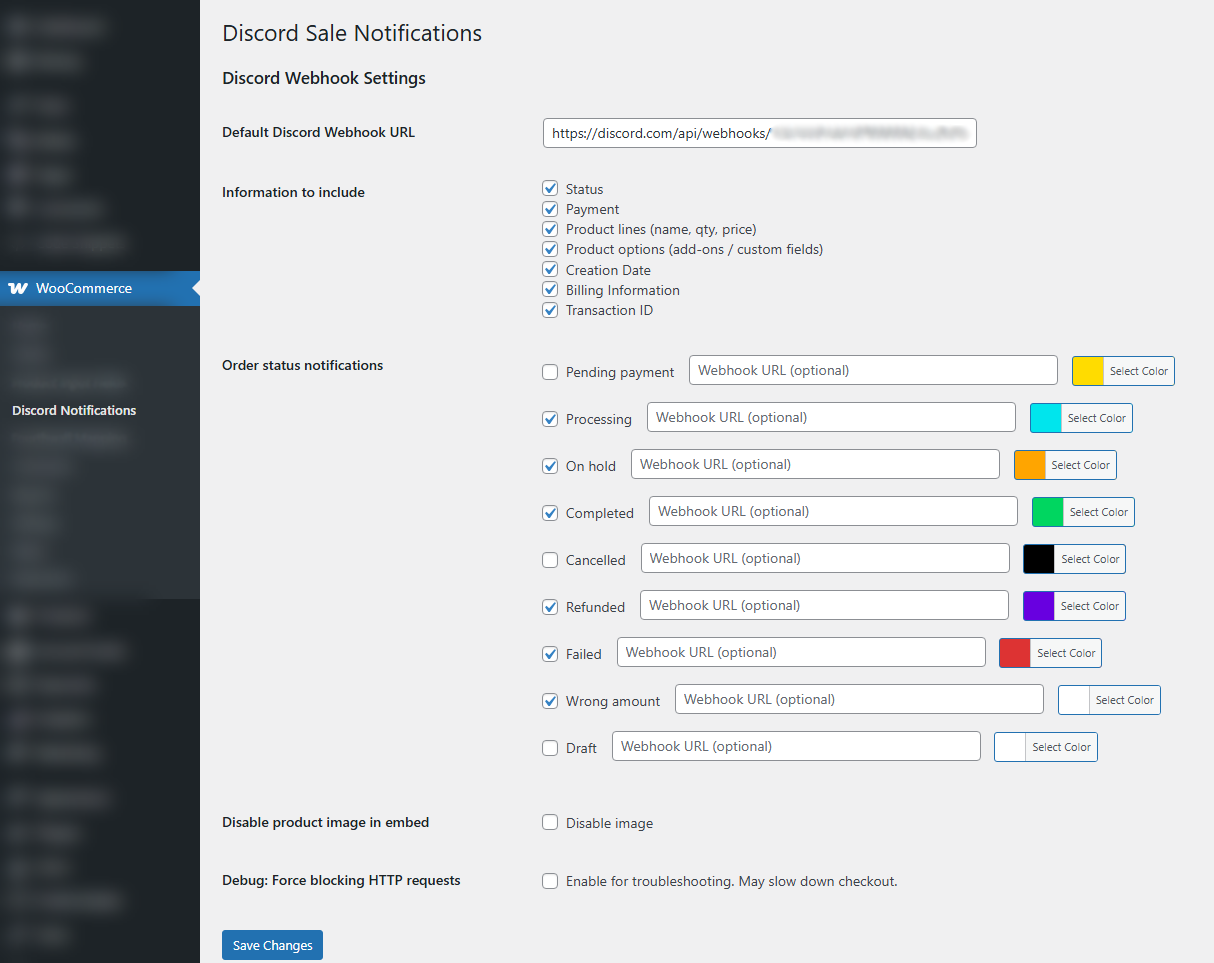
Settings page under WooCommerce Discord Notifications 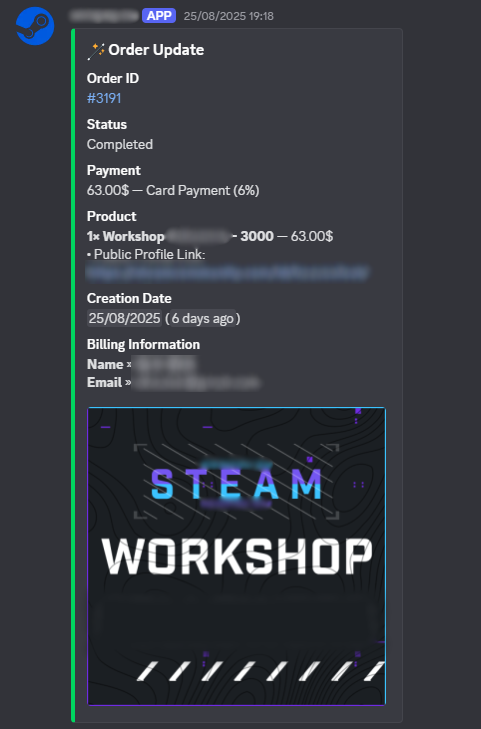
Image of a completed order Discord webhook
Inštalácia
- Download this plugin or clone the repo into
/wp-content/plugins/wc-sale-discord-notifications. - Activate the plugin via Plugins Installed Plugins.
- Go to WooCommerce Discord Notifications.
- Configure your settings.
Recenzie


Prispievatelia a vývojári
“WC Sale Discord Notifications” je softvér s otvoreným zdrojovým kódom. Do tohto pluginu prispeli nasledujúci ľudia.
Prispievatelia
Preložiť „WC Sale Discord Notifications“ do vašho jazyka.
Máte záujem o vývoj?
Prehľadávajte zdrojový kód, preskúmajte SVN repozitár, alebo sa prihláste na odber vývojárskeho logu cez RSS.
Zoznam zmien
3.2.0
- Optional embed field: shipping method (chosen freight) with tax-inclusive price per shipping line
- Embed field order – drag-and-drop list in settings to arrange Discord embed fields (filter:
wc_sale_discord_field_order) - Each embed field carries a stable
internal_idfor size trimming with translated titles - Optional embed field New or returning customer (based on prior orders with completed/processing/on-hold status, excluding the current order). Filters:
wc_sale_discord_returning_customer_order_statuses,wc_sale_discord_customer_type_label
3.1.2
- Subscription-aware embed titles when WooCommerce Subscriptions is active (New subscription, Subscription Renewal)
- HTML entity decoding for price display so currency symbols render correctly in Discord (e.g. kr, €, £)
- Filter
wc_sale_discord_embed_titlefor customizing embed titles
3.1.1
- Customer notes only toggle – exclude internal/admin notes when Order Notes is included
- Automatic embed size trimming to fit Discord’s 6000 character limit
- UTF-8 safe truncation for field values (mb_substr when available)
- Webhook error logging via WooCommerce logger
- Prefer WC_Order::get_customer_order_notes() when available (WC 9.2+)
- Code quality: docblocks, type hints, removed redundant logic
3.1
- Implemented notification for Initiating Payment (when order is placed with pending status, before payment completes)
- Implemented embedded fields for Order Notes
- When Initiating Payments is enabled: sends „Initiating payment“ for pending orders, then „New Order!“ when payment completes (processing)
3.0
- Updated plugin logo.
2.3
- Added support for custom product fields in Discord notifications.
- New „Custom Fields“ toggle in settings—when enabled, product-level custom fields (from add-ons/APF) are included in order item details.
2.2
- Implemented per-status duplicate protection using order meta instead of a global flag.
- Removed redundant duplicate-check logic and double log writes.
- Added sanitization callbacks for all plugin options to improve data safety.
- Made Discord webhook POST asynchronous (
blocking => false) with basic error handling. - Improved status change hook to only trigger on selected statuses.
- Enhanced embed field building with formatted totals, safe hex color handling, and image fallback.
- Updated „Tested up to“ and „WC tested up to“ versions.
2.1
- Admin setting to choose what fields to include in Discord messages.
- Added protection against duplicate notifications using order meta.
- Per-status webhook URL support.
- Full compatibility with WooCommerce 8+ (custom order tables).
2.0
- Added option to exclude product image from embeds.
1.9
- Added notifications for changes in order status.
1.8 and below
- Initial features and webhook sending.