

Popis
Diigo Online Bookmarking Widget
Display bookmarks from Diigo in your sidebar. Uses Diigo API to fetch the bookmarks.
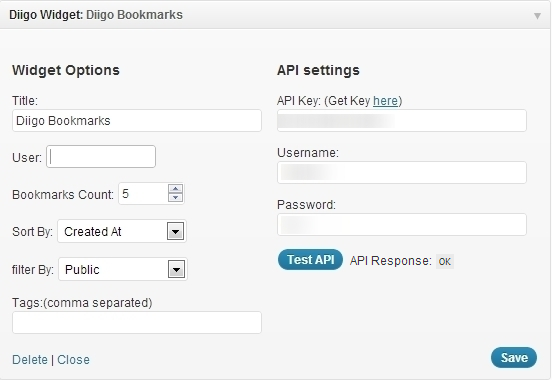
- First get an API key from here
- Use this key along with your username and password in the widget settings.
- Then click the „Test API“ button to test the api response.
- Set widget options. You can mention the ‚User‘ input to fetch bookmarks from a particular user or leave it empty to fetch any public bookmark.
Obrázky

Inštalácia
- Upload
diigo-widget.phpto the/wp-content/plugins/directory - Activate the plugin through the ‚Plugins‘ menu in WordPress
- Go to Appearance->Widget and use ‚Diigo Widget‘ on your siderbar
- Get your diigo API key from http://www.diigo.com/api_keys/new/
- Enter your Diigo account username and password
Recenzie
Pre tento plugin nie sú žiadne recenzie.
Prispievatelia a vývojári
“Diigo Bookmarks Widget” je softvér s otvoreným zdrojovým kódom. Do tohto pluginu prispeli nasledujúci ľudia.
Prispievatelia
Preložiť „Diigo Bookmarks Widget“ do vašho jazyka.
Máte záujem o vývoj?
Prehľadávajte zdrojový kód, preskúmajte SVN repozitár, alebo sa prihláste na odber vývojárskeho logu cez RSS.