

Popis
How to Add Gradient Text in Elementor
Looking for a simple way to add gradient text in Elementor without writing CSS or buying Elementor Pro? LMSCrafter Gradient Text for Elementor is the solution.
This lightweight plugin adds two dedicated gradient text widgets to your Elementor editor, one for headings and one for rich text content. Just drag, drop, pick your gradient, and you’re done. No coding, no bloat, no Pro required.
Why Choose LMSCrafter Gradient Text for Elementor?
Most gradient text solutions require either Elementor Pro with custom CSS knowledge, or installing a massive 100+ widget addon suite just for one feature. This plugin does one thing perfectly: gradient text for Elementor, and nothing else.
Two Powerful Widgets
- Gradient Text – Perfect for gradient headings, titles, and short text. Supports H1-H6, p, span, and div tags with optional link wrapping.
- Gradient Text Editor – A full WYSIWYG rich text editor with gradient support. Add gradient effects to paragraphs, bold text, italic text, lists, and any formatted content.
20 Beautiful Preset Gradient Palettes
Get started instantly with curated gradient presets:
- Sunset – Warm orange to pink
- Ocean – Deep blue to cyan
- Forest – Teal to green
- Fire – Red to orange
- Purple Rain – Violet to magenta
- Cherry Blossom – Pink floral
- Northern Lights – Green to blue aurora
- Citrus – Orange to yellow
- Frost – Icy blue gradient
- Rose Gold – Warm metallic blush
- Midnight – Dark teal
- Candy – Purple to cyan
- Neon – Electric green to blue
- Peach – Peach to coral
- Royal – Deep purple
- Bubblegum – Playful pink
- Aurora – Cyan to green
- Cyber – Vibrant pink to purple (3-color)
- Warm Flame – Orange flame
- Mango – Yellow to orange
Full Customization
- Custom Gradient Colors – Pick your own colors with up to 5 color stops
- Linear & Radial Gradients – Choose gradient type and control the angle
- Highlighted Text – Apply gradient to specific words in a heading instead of the entire text
- Gradient Pill Effect – Add a gradient pill background behind highlighted words
- Gradient Underline – Thick gradient underline bar beneath highlighted words
- Gradient Marker – Highlighter pen effect on highlighted words
- Gradient Glow – Soft gradient glow effect behind highlighted words
- Animated Gradient – Flowing, shifting gradient animation with speed and direction controls
- Text Stroke Gradient – Apply gradient to text outline for stunning hollow text effects
- Hover Effects – Add a different gradient on hover for interactive text
- Full Typography Control – Font family, size, weight, letter spacing, and text shadow
- Responsive Alignment – Set different alignment for desktop, tablet, and mobile
- Link Support – Make your gradient text a clickable link
Works with Elementor Free
Unlike custom CSS methods that require Elementor Pro, this plugin works with the free version of Elementor. No Pro license needed!
Lightweight & Conflict-Free
- Single-purpose plugin that does one thing perfectly
- Properly namespaced code (prefixed with
lmsc-gte-) to avoid conflicts with themes and other plugins - No jQuery dependencies, no external API calls, no database tables
- Compatible with all WordPress themes and Elementor addons
Support
Need help? Visit our Support Center for documentation and assistance.
For Developers
The plugin exposes a lmsc_gte_preset_gradients filter so theme and plugin authors can register custom presets without forking:
add_filter( 'lmsc_gte_preset_gradients', function ( $presets ) {
    $presets['brand'] = [
        'label'  => __( 'Brand', 'my-theme' ),
        'colors' => [ '#0a3d62', '#3c6382' ],
    ];
    return $presets;
} );
A new „Gradient Text“ dynamic tag is also registered under Elementor’s Site group — open the dynamic-content menu inside any text field and pick it to apply gradient styling without dragging a widget. The tag works inside any Elementor field that preserves HTML markup (Heading, Text Editor, HTML widget, button labels with wp_kses_post rendering, and most theme builder fields).
Obrázky

Two gradient text widgets available in the Elementor widget panel — Gradient Text and Gradient Text Editor 
Beautiful gradient text examples showcasing multiple preset palettes in action 
20+ curated gradient presets dropdown — Sunset, Ocean, Forest, Neon, Cyber, and more 
Preset Palette mode with gradient type, angle, animation, text stroke, and hover controls 
Custom gradient mode with color pickers, third color stop, and full gradient controls 
Animated gradient text in action — flowing color animation with adjustable speed and direction 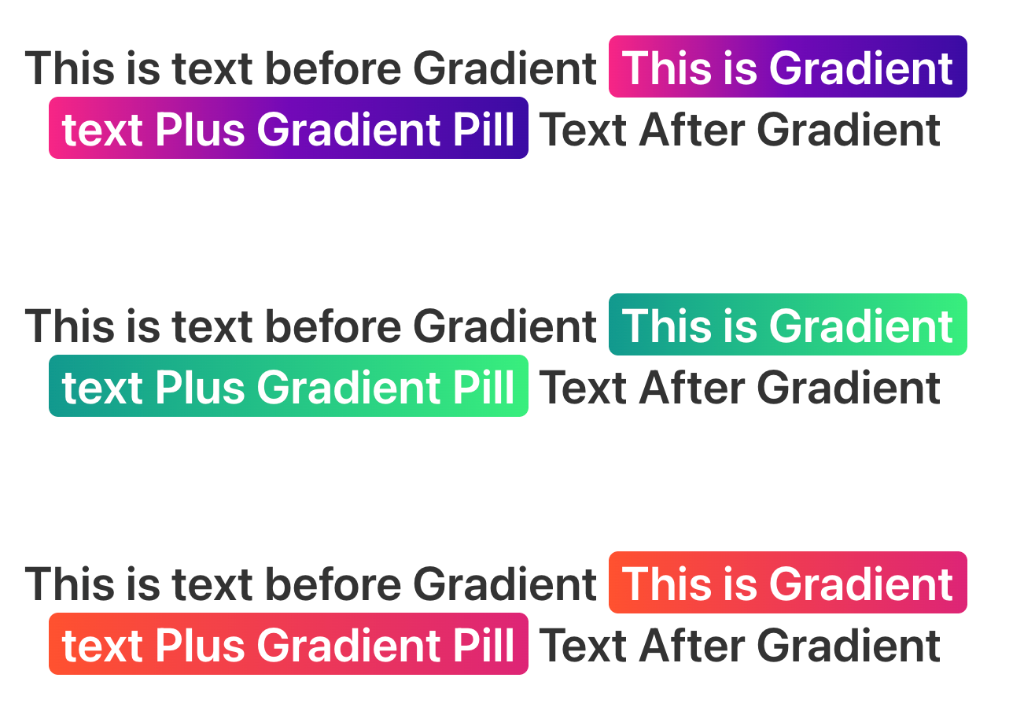
Gradient Pill and Highlight effects — apply gradient pill, underline, marker, and glow effects to specific words
Inštalácia
How to Install LMSCrafter Gradient Text for Elementor
- Upload the
lmscrafter-gradient-text-for-elementorfolder to/wp-content/plugins/ - Activate the plugin through the Plugins menu in WordPress
- Make sure Elementor (free or Pro) is installed and active
- Edit any page with Elementor
- Search for „Gradient Text“ in the widget panel
- Drag the widget onto your page and start customizing!
Časté otázky
-
How do I add gradient text in Elementor?
-
Install and activate this plugin, then edit any page with Elementor. Search for „Gradient Text“ in the widget panel, drag the widget onto your page, and choose a preset gradient or create a custom one. No CSS knowledge required!
-
Does this gradient text plugin require Elementor Pro?
-
No! This plugin works with the free version of Elementor. You don’t need Elementor Pro to create gradient text.
-
Can I add gradient to paragraph text, not just headings?
-
Yes! The Gradient Text Editor widget provides a full WYSIWYG rich text editor with gradient support. You can add gradient effects to paragraphs, lists, bold text, and any formatted content.
-
Can I use more than two gradient colors?
-
Yes. In custom mode you can enable up to five color stops, so you can build anything from a simple two-color gradient all the way to vivid multi-stop rainbow effects.
-
Does it support responsive design?
-
Yes, the text alignment can be set independently for desktop, tablet, and mobile devices.
-
Will this plugin slow down my website?
-
No. The plugin is extremely lightweight. It uses pure CSS for gradient rendering with no JavaScript, no jQuery, and no external API calls. Zero impact on page load performance.
-
Will this plugin conflict with my theme or other plugins?
-
No. The plugin uses properly namespaced CSS classes (prefixed with
lmsc-gte-) and PHP functions (prefixed withlmsc_gte_) to avoid conflicts. It does not modify any existing Elementor widgets or WordPress functionality. -
Can I add animated gradient text in Elementor?
-
Yes! This plugin includes a built-in gradient animation feature. Simply enable the „Gradient Animation“ toggle in the Style tab, and your gradient text will have a smooth, flowing color animation. You can control the animation speed (1-20 seconds) and choose from three directions: horizontal, vertical, or diagonal. The animation is pure CSS — no JavaScript — so it has zero impact on performance.
-
What is the difference between Gradient Text and Gradient Text Editor?
-
Gradient Text is a heading-style widget, perfect for titles, H1-H6 tags, and short gradient text. Gradient Text Editor is a WYSIWYG-based widget, perfect for longer content, paragraphs, lists, and rich formatted text with gradient effects.
Recenzie


Prispievatelia a vývojári
“LMSCrafter Gradient Text for Elementor” je softvér s otvoreným zdrojovým kódom. Do tohto pluginu prispeli nasledujúci ľudia.
Prispievatelia

Preložiť „LMSCrafter Gradient Text for Elementor“ do vašho jazyka.
Máte záujem o vývoj?
Prehľadávajte zdrojový kód, preskúmajte SVN repozitár, alebo sa prihláste na odber vývojárskeho logu cez RSS.
Zoznam zmien
1.8.0
- New: Gradient Text Dynamic Tag — drop gradient text into any Elementor field that supports dynamic content (heading titles, button labels, post titles in loops, image captions, custom HTML, etc.) without dragging a dedicated widget.
- New: Conic gradient support —
conic-gradient(from <angle>, …)joins linear and radial as a third gradient type for sweeping color-wheel effects on text. - New: Animation easing control — choose from Linear, Ease, Ease In, Ease Out, or Ease In-Out for animated gradients (was hardcoded
ease). - New: Site Health debug panel section — exposes plugin version, detected Elementor version, textdomain status, and dynamic tag registration so support tickets can be diagnosed faster.
1.7.1
- Fixed: Highlight spans (none, underline, glow modes) no longer render invisible on browsers without
background-clip: textsupport — added a@supports notCSS fallback that recovers them to a readable solid color. - Improved: Minimum required Elementor version raised from 3.0.0 to 3.15.0 — old, unmaintained Elementor installs now see a clean admin notice instead of risking runtime errors.
- Fixed: FAQ now correctly states that custom gradients support up to five color stops (was outdated and said three).
1.7.0
- Improved: Internal refactor — preset palette, color sanitization, and gradient builder consolidated into a shared trait. Both widgets now share a single source of truth (~400 fewer duplicated lines).
- Improved: Frontend stylesheet now loads conditionally — only on pages that actually use a gradient widget. Pages without the widget skip the request entirely.
- Improved: Color sanitization now uses WordPress core sanitize_hex_color() for hex values, with a tightened functional-notation regex.
- Improved: PHP type hints added across the gradient helper trait for better IDE support and earlier error detection.
- Improved: Gradient Text Editor now defaults to the same „Sunset“ preset as the Gradient Text widget for a consistent first-run experience.
- Improved: CSS @supports gating ensures non-webkit browsers see a visible fallback color instead of invisible transparent text.
- Improved: :focus-visible outline added for keyboard users on linked gradient text.
- Added: load_plugin_textdomain() hook so translations work for self-hosted distributions, not just WordPress.org.
- Added: lmsc_gte_preset_gradients filter — themes and developers can register custom palettes without forking the plugin.
- Added: LICENSE.txt, CHANGELOG.md, and .gitignore for proper repository hygiene.
1.6.0
- New: Support for 4th and 5th color stops in custom gradients — create stunning rainbow and multi-color effects
- New: 20 ready-to-use preset CSS classes (e.g. lmsc-gte-gradient-sunset) — apply gradient text to any Elementor widget via Advanced > CSS Classes
- New: SEO-friendly plain text fallback via render_plain_content() for search engines, RSS feeds, and screen readers
- Improved: Accessibility — gradient animations now respect prefers-reduced-motion browser setting
- Improved: CSS version bumped to 1.6.0
1.5.0
- Improved: Redesigned highlighted text UX with intuitive 3-field layout (Before Text / Gradient Text / After Text)
- Fixed: Hover effect not working — replaced wp_add_inline_style with inline style output (timing issue)
- Fixed: Pill, Underline, Marker, Glow effects now use direct inline styles for full browser compatibility
- Fixed: Text selectability in Elementor editor when using full gradient mode
- Improved: All highlight effects now render correctly in both frontend and Elementor live preview
- Improved: Simplified CSS — removed redundant CSS-variable-based rules
- Verified: Full code sanitization audit passed (esc_html, esc_attr, sanitize_color, absint, wp_kses_post)
1.4.0
- New: Highlighted Text feature — apply gradient to specific words within a heading
- New: Gradient Pill effect — gradient background pill behind highlighted words
- New: Gradient Underline effect — thick gradient bar beneath highlighted words
- New: Gradient Marker effect — highlighter pen effect on highlighted words
- New: Gradient Glow effect — soft gradient glow behind highlighted words
- New: Base Text Color control for non-highlighted text
- New: Highlight padding, border radius, and underline height controls
- Fixed: Rose Gold preset now uses actual rose gold colors (was hot pink)
- Fixed: Cherry Blossom preset now uses vibrant pink tones (was washed out)
- Fixed: Peach preset now uses visible peach-to-coral colors (was too light)
- Fixed: Aurora preset now uses cyan-to-green like real aurora (was pastel)
- Fixed: Warm Flame preset now uses orange flame colors (was pastel pink)
- Fixed: Midnight preset now uses dark teal gradient (was invisible gray)
- Fixed: Royal preset now uses deep purple gradient (was invisible navy)
- Fixed: Frost preset now uses icy blue gradient (was too dark)
1.3.1
- Improved: Optimized plugin tags for better WordPress.org search discoverability
- New: Animated gradient plugin icon for WordPress.org directory
1.3.0
- New: Animated gradient effect with flowing color animation (CSS-only, no JavaScript)
- New: Animation speed control (1-20 seconds)
- New: Animation direction control (horizontal, vertical, diagonal)
- New: Text stroke/outline gradient mode (Fill, Stroke, or Both)
- New: Stroke width control (1-10px)
- New: 8 additional gradient presets (Neon, Peach, Royal, Bubblegum, Aurora, Cyber, Warm Flame, Mango)
- Total of 20 curated gradient presets
- Updated prefix references in documentation
1.2.0
- New: Gradient Text Editor widget with WYSIWYG rich text support
- Improved: Color value sanitization for enhanced security
- Improved: Defensive widget loading to prevent fatal errors
- Improved: Full PHPDoc documentation on all functions and methods
- Improved: XSS prevention in editor template
- Added: Security index.php files in all directories
- Added: uninstall.php for clean uninstallation
- Added: Capability checks on admin notices
- Added: Translation support with load_plugin_textdomain
1.0.0
- Initial release
- 12 preset gradient palettes
- Custom gradient with up to 3 color stops
- Linear and radial gradient types
- Hover gradient effect
- Full typography and text shadow controls
- Responsive alignment
- Link support