
Popis
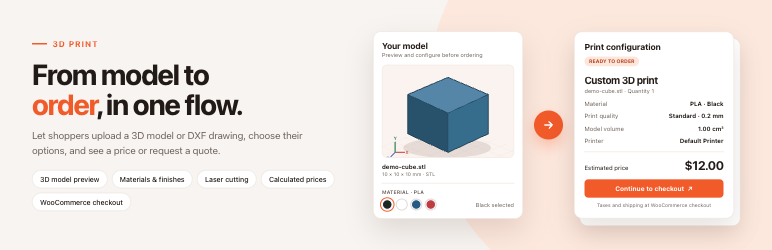
3DPrint turns your WooCommerce store into a self-service 3D printing and laser cutting shop. Drop the configurator on any page, build your catalog of materials and printers, and let customers quote and order themselves — no manual emailing of STL files back and forth.
DEMO: https://demo.add-ons.org/3d-print/3d-printing-service/
Pro Version: https://add-ons.org/plugin/3dprint/
DOCUMENTATION:
How it works
- The customer uploads an STL, OBJ, 3MF, STEP or DXF file.
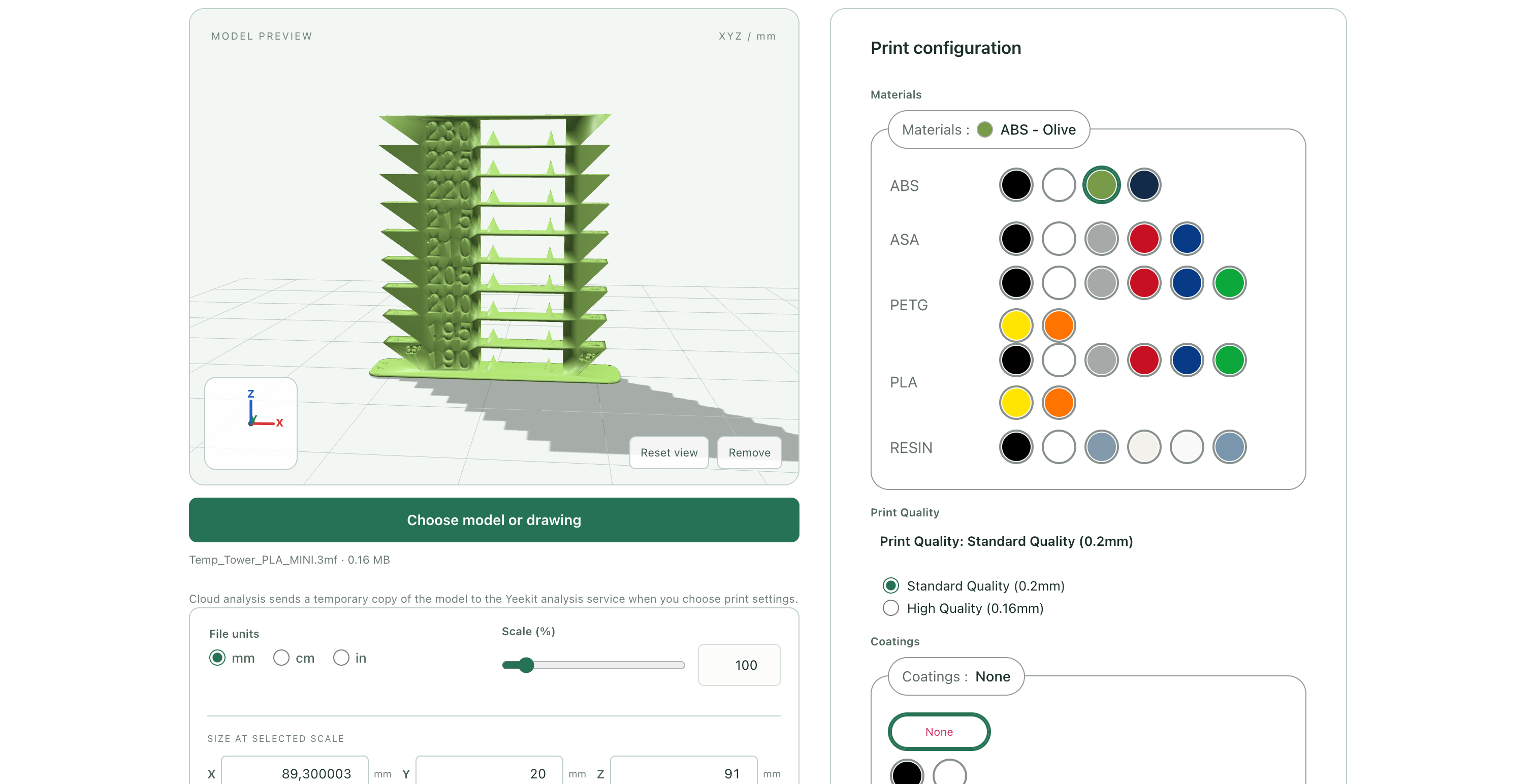
- The model renders in an interactive 3D preview with dimensions, volume and surface area.
- The customer chooses Material, Printer, Print Quality, Coating, Post-processing and Infill — only compatible combinations are offered.
- The price updates live as options change.
- The customer adds the model to the cart and pays with any WooCommerce payment method — or sends a price request when you prefer to quote manually.
Interactive 3D preview
- Supports STL (ASCII and binary), OBJ, 3MF and STEP/STP (converted in the browser with OpenCascade WebAssembly).
- Shows bounding dimensions, volume, surface area, triangle count and solid-mesh volume.
- Displays the model in the selected material color.
- Customers can switch displayed units (mm / cm / in) and scale the model by editing any X/Y/Z size — the other sizes and the price follow automatically.
- Build-volume warning when the model exceeds the selected printer.
- Fully customizable scene: background, ground, grid, fog, XYZ axes, build volume box, light positions, auto rotation, shadows, auto-fit and auto-scaling.
- Optional „Explore the Demo“ card loads a sample cube so visitors can try the configurator without uploading anything.
- All viewer assets are bundled locally — no external CDN.
Five print option catalogs
Each option is a WordPress post type with its own editor, so the catalog is as simple or as detailed as your shop needs:
- Materials — base price with a configurable pricing basis, up to 20 extra price rows, preview color, density, optional layer-height override and allowed printers.
- Printers — price per piece, one setup fee per uploaded model, build volume, editable Print Quality choices with layer heights, and compatible materials.
- Coatings — optional single choice, price per piece.
- Post-processings — optional multiple choice (checkboxes) or single choice (radio / dropdown), price per piece.
- Infills — percentage, price per piece.
Choose how each catalog is displayed: grouped select with colors, color palette by group, radio list, checkboxes, dropdown, selectable list — or hide a catalog entirely.
Smart compatibility
- Decide whether customers pick Materials first or Printers first.
- After the first choice, later lists show only compatible options. Leave the restriction empty to allow everything.
- Changing an earlier choice clears incompatible selections automatically.
- With only one Printer available, the Printer control is hidden and selected automatically. With one Print Quality, that is hidden too — customers only see choices that matter.
- Each required step unlocks in sequence, in a standard or accordion step layout, themed with your main brand color.
Flexible pricing
Price = sum of selected option prices × quantity, plus Material and Printer setup fees once per uploaded model.
Material base prices and extra price rows can be calculated from:
- Fixed per piece
- % of the base material price
- Per gram (actual or volumetric weight)
- Per cm³ of solid volume or bounding-box volume
- Per cm² of surface area or bounding XY area
- Per cm³ of support material, or a fixed charge when supports are needed (cloud slicer)
- Per cm³ of removed material (for subtractive work)
- Per cm of laser cutting path (DXF)
Prices follow your WooCommerce currency and tax settings. WooCommerce handles tax, coupons, shipping and payments as usual. The server recalculates every price when the model is submitted and again at checkout, so the customer always pays the current catalog price.
Four checkout behaviors
- Calculate price and add to checkout — one button straight to payment.
- Calculate price and add to cart and checkout — separate Add to cart (customer stays on the page with a View cart link) and Checkout buttons.
- Give an estimate and request price — shows an estimated subtotal and collects contact details instead of creating a cart item.
- Request price — collects contact details only, no price shown.
Whenever a configuration cannot be priced automatically (a blank service price, a zero-priced material, an unsupported file), the configurator switches to a price request form by itself, so you never lose a lead. Explicitly zero-priced Printers, Coatings, Post-processings and Infills are treated as free options.
Price request form
- Email is always required; choose whether Full name, Company, Phone and Notes are required, optional or hidden.
- Optional email notification to any recipient with a customizable subject and a
{quote_id}placeholder. - The notification links to the protected quote in your admin — the model file itself is never attached or exposed.
Laser cutting from DXF drawings
- Upload ASCII DXF drawings (up to 5 MB) and get a 2D preview with a dedicated laser-cutting configurator.
- Customers choose Cut, Engrave or Ignore for every layer.
- Cut length is measured on the server and priced per cm of path; engraving uses the machine’s engraving rate per cm.
- Supports LINE, CIRCLE, ARC, ELLIPSE, straight LWPOLYLINE and SPLINE entities. Drawings with other entities, and DWG files, fall back to the manual quote form.
- Sample data includes an editable Default Laser Cutter plus Plywood 3 mm and Acrylic 3 mm materials.
Cloud PrusaSlicer analysis (optional)
Enable the publisher-hosted slicing service to show real sliced material usage, support volume, print time and filament weight — and to price by support volume or print hours. Printer settings control nozzle diameter, layer height, speed and automatic supports; Infill settings control percentage and pattern; Material settings control filament diameter and density.
- Nothing to install on your server — PrusaSlicer is not required on your hosting.
- Every registered site gets 50 free test analyses.
- A purchase code from add-ons.org unlocks 5,000 analyses per month, shared across your sites.
- Switch it off at any time; models are then never sent to the service.
WooCommerce integration
- Works with classic checkout, Cart/Checkout Blocks and HPOS.
- Each upload is its own cart line with its own private file, options and price snapshot.
- A hidden internal product carries models into the cart; it never appears in your catalog, search or sitemap and cannot be bought without a validated upload.
- Saved Model Stats and print options are copied to the order line item, so you can see exactly what was ordered without re-opening the file.
- Independent of your regular products and variations.
Quotes and Orders dashboard
- 3DPrint Quotes and Orders lists every uploaded model, including those still waiting for checkout.
- Unviewed quotes and orders are counted in the menu and highlighted in the list.
- Open a record to see model statistics, selected print options, layer height, customer name and email, download the original file, and jump to the linked WooCommerce order.
Privacy and file handling
- Original files are stored in a private database table — never in the public Media Library.
- Only shop managers and the authenticated order owner can download a model. Guests can purchase but never receive a public file link.
- Choose which formats customers may upload (STL, OBJ, 3MF, STEP, STP, DXF on by default; DWG off) and the maximum file size (default 10 MB, up to 20 MB).
- Abandoned uploads expire after a configurable retention period (default 90 days); files linked to active orders are kept.
- WordPress privacy export and erase tools cover model metadata.
- Uninstall keeps your data unless you explicitly opt in to deletion. WooCommerce orders are never deleted.
Quick start with sample data
Activation creates no catalog entries. Open 3DPrint Settings Sample data to generate editable 3D printing and CNC/laser cutting examples with one click — materials with density, printers with quality choices, coatings, post-processings and infills, all with starter prices. Remove them again from the same tab without touching entries you created yourself.
The read-only Pricing guide tab explains every pricing rule with a worked example.
Development and source
The complete human-readable source for the generated browser files is included: src/frontend.js and src/model-stats.mjs build assets/frontend.js; src/model-worker.js builds assets/model-worker.js. Run npm ci then npm run build from the plugin directory to regenerate the assets and their license notices (esbuild, Three.js 0.186.0). No runtime CDN is used.
Bundled third-party code: Three.js 0.186.0 (MIT, https://github.com/mrdoob/three.js) including fflate 0.8.2 (MIT, https://github.com/101arrowz/fflate) — see assets/frontend.js.LEGAL.txt, assets/model-worker.js.LEGAL.txt and assets/license.three.txt. STEP preview uses occt-import-js 0.0.23 and OpenCascade (LGPL 2.1 with the OpenCascade exception; https://github.com/kovacsv/occt-import-js and https://github.com/Open-Cascade-SAS/OCCT) — see assets/license.occt-import-js.txt, assets/license.occt.txt and assets/license.occt-exception.txt. The occt-import-js.js and occt-import-js.wasm files match the published npm package byte for byte.
Obrázky
Bloky
Tento plugin poskytuje 1 blok.
- 3D Print 3D model upload, print configuration, price request and WooCommerce checkout.
Inštalácia
- Install and activate WooCommerce, then activate 3DPrint.
- Go to 3DPrint Settings Sample data and create the example catalog, or add your own Materials and Printers from the 3DPrint menu.
- Review prices, setup fees and printer build volumes before taking paid orders.
- Insert the 3DPrint block in a page, or add the
[yeekit_3d]shortcode. - Configure WooCommerce payment methods, shipping and taxes. Place a test order with a test-mode gateway first.
Requirements: PHP ZipArchive for 3MF uploads; a browser with WebGL and WebAssembly. The effective upload limit is the smaller of the plugin limit and your PHP upload limits. Activate per site on multisite (network activation is not supported).
Časté otázky
-
Can prices depend on model volume, weight or print time?
-
Yes. Set a Material base-price basis or add extra price rows for solid volume, bounding volume, surface area, weight, support material, print hours or laser cutting path. Geometry is measured on the server; support and print-time rules use the optional cloud PrusaSlicer analysis.
-
Which file formats are supported?
-
STL, OBJ, 3MF and STEP/STP for 3D printing with full preview and automatic pricing; ASCII DXF for laser cutting with 2D preview. DWG and DXF drawings with unsupported entities can still be submitted as a manual price request.
-
Do I need to install PrusaSlicer on my server?
-
No. Cloud analysis runs on the publisher-hosted service. Without it, the plugin still prices by geometry and estimates weight from material density.
-
Does the preview guarantee the model is printable?
-
No. Dimensions and build-volume warnings are estimates. There is no automatic mesh repair; review models according to your own production workflow.
-
What happens if a model cannot be priced?
-
The configurator shows the price request form instead of the cart buttons. The quote is saved and you can reply with a manual offer.
-
Why might a valid model fail to preview?
-
Very large files can hit browser limits: a 45-second processing timeout, a two-million-triangle limit, and bounded 3MF archives (256 entries, 64 MB expanded, 8 MB per model XML).
-
Can customers scale their model?
-
Yes. Editing any X/Y/Z dimension applies a uniform scale, and the price follows. You can hide the unit and scale controls in Settings Model preview.
-
Does it work with the WooCommerce block checkout?
-
Yes. Classic checkout, Cart/Checkout Blocks and HPOS are all supported.
Recenzie
Pre tento plugin nie sú žiadne recenzie.
Prispievatelia a vývojári
“3DPrint – 3D Print Calculator” je softvér s otvoreným zdrojovým kódom. Do tohto pluginu prispeli nasledujúci ľudia.
Prispievatelia
Preložiť „3DPrint – 3D Print Calculator“ do vašho jazyka.
Máte záujem o vývoj?
Prehľadávajte zdrojový kód, preskúmajte SVN repozitár, alebo sa prihláste na odber vývojárskeho logu cez RSS.
Zoznam zmien
1.3.14
- Rewritten readme focused on features.