
Popis
This tool allows you to monitor, dequeue and requeue scripts and styles that are enqueued on your site. It is designed for frontend performance engineers who want to view and manage all assets enqueued on any page and control the minification and concatenation themselves.
For background, please read Chris Coyier’s initial request.
Warning: This plugin makes it easy to break your site. Don’t use this unless you know what you’re doing.
Ako pouzivat
Once the plugin is activated, browse to any page on the front of your site. An Assets link will appear on the top right of the admin bar. Click that to view and manage all assets.
Vývojári
Development takes place on GitHub. Patches welcome.
Obrázky
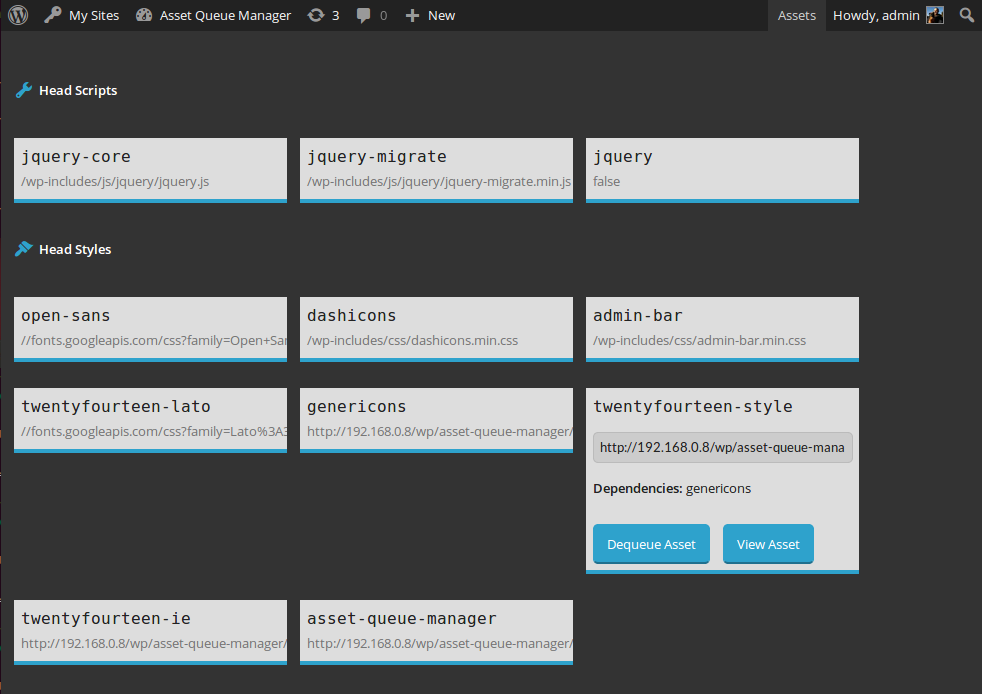
View details about assets enqueued in the head or footer. Dequeue them or view them for copying and minifying on your own. 
View details about assets that are being dequeued by this plugin. Requeue them or view them for copying and minifying on your own.
Inštalácia
- Unzip
asset-queue-manager.zip - Upload the contents of
asset-queue-manager.zipto the/wp-content/plugins/directory - Aktivujte modul cez položku „Moduly“ v menu vo WordPress
Časté otázky
- I dequeued jQuery (or something I shouldn’t have) and now my site is broken
-
Go to the list of plugins in your admin panel. Find the Asset Queue Manager and click the „Restore Dequeued Assets“ link.
Recenzie


Prispievatelia a vývojári
“Asset Queue Manager” je softvér s otvoreným zdrojovým kódom. Do tohto pluginu prispeli nasledujúci ľudia.
Prispievatelia
Preložiť „Asset Queue Manager“ do vašho jazyka.
Máte záujem o vývoj?
Prehľadávajte zdrojový kód, preskúmajte SVN repozitár, alebo sa prihláste na odber vývojárskeho logu cez RSS.
Zoznam zmien
1.0.3 (2016-03-10)
- Fix #5: issues with third-party code which extends native types. h/t @AndiDittrich of https://wordpress.org/plugins/enlighter/
1.0.2 (2016-02-17)
- Fix #4: allow assets with dots in the handle to be managed
1.0.1 (2014-12-17)
- Fix critical bug where assets were only dequeued for logged in users with the admin bar present
1.0 (2014-10-23)
- Prvé vydanie