
Popis
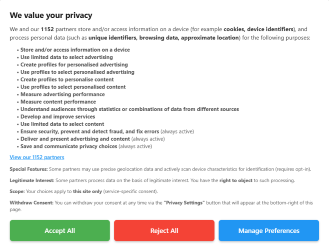
PrivacyHub Cookie Consent connects your WordPress site to the PrivacyHub consent platform.
It helps site owners deploy and manage consent banners, block non-essential scripts until consent is granted, and send Google Consent Mode v2 signals.
Supported banner and framework modes include:
- Simple banner
- Enhanced banner
- IAB TCF for GDPR and ePrivacy use cases
- US GPP banner for US state privacy use cases
PrivacyHub can be configured for websites operating in or targeting regions such as:
- European Union and EEA
- United Kingdom
- Switzerland
- United States
- Canada
- Brazil
- South Africa
- Australia
- Singapore
- Middle East deployments using PrivacyHub regional configurations
Key features:
- Loads your configured PrivacyHub banner using your Website ID
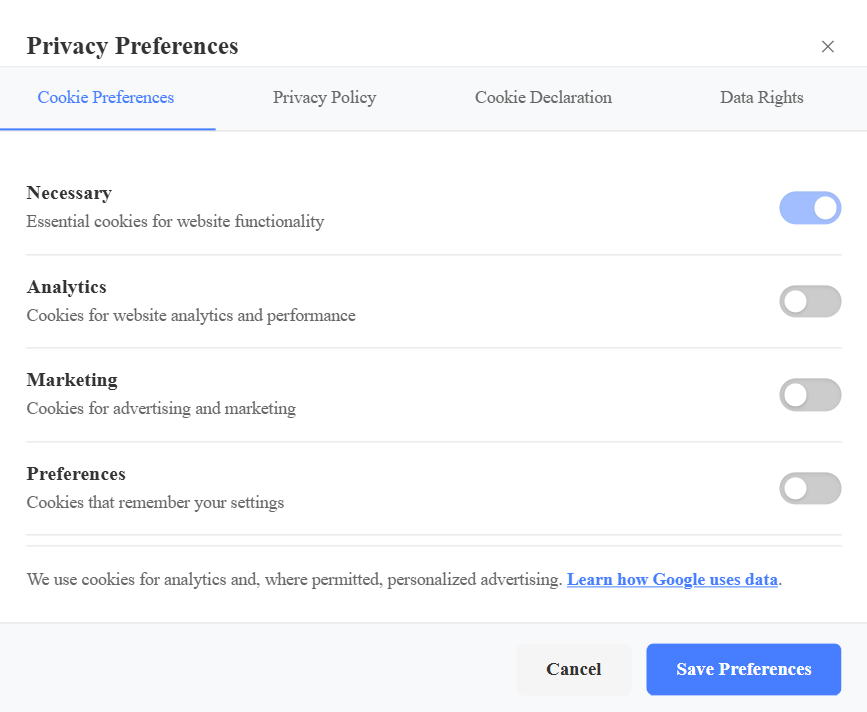
- Block-first handling for common analytics, marketing, and preferences scripts
- Google Consent Mode v2 default and update signaling
- Optional GA4 and GTM runtime loading after consent
- Admin settings page for Website ID, script blocking, and Google Consent Mode configuration
External services
This plugin connects to external services to load the consent runtime and, when configured by the site owner, send Google Consent Mode v2 signals and load Google tags after consent.
It may contact:
https://api.privacyhub.ai/functions/v1/cookie-consent-scripthttps://api.privacyhub.ai/functions/v1/ph(optional thin loader, when enabled by integrators)https://www.googletagmanager.com/gtag/js(when a GA4 Measurement ID is configured and analytics consent is granted)https://www.googletagmanager.com/gtm.js(when a GTM Container ID is configured and eligible consent is granted)
What the services are used for:
- Retrieve and render the configured PrivacyHub consent banner for the current Website ID
- Apply configured consent behavior for the active site and region setup
- Process consent-related frontend runtime behavior configured in PrivacyHub
- Initialize Google Consent Mode v2 defaults and updates
- Load GA4 or GTM only after the relevant consent state allows it
When they are called:
- On frontend page loads when the plugin is enabled and a Website ID is configured
- After consent is granted, if GA4 and/or GTM IDs are configured by the site owner
What is sent:
- The configured Website ID in the PrivacyHub script request query string
- Standard browser request metadata automatically sent by the site visitor’s browser to the destination host
- Google tag requests generated by the site owner’s configured GA4 or GTM implementation after consent
Service providers:
- PrivacyHub
Service links:
- PrivacyHub website: https://www.privacyhub.ai/
- Register: https://www.privacyhub.ai/register
- Login: https://www.privacyhub.ai/login
- Privacy policy: https://www.privacyhub.ai/privacy-policy
- Help center: https://www.privacyhub.ai/help-center/enable-google-consent-mode
- Google business privacy information: https://business.safety.google/privacy/
Asset licensing
The bundled plugin assets in the assets/ directory are original PrivacyHub branding assets distributed with this plugin release for use within the plugin admin interface.
Obrázky


Inštalácia
- Upload the plugin zip in WordPress or copy the plugin folder to
/wp-content/plugins/. - Activate PrivacyHub Cookie Consent.
- Open PrivacyHub Consent from the left admin menu.
- Enter your PrivacyHub Website ID.
- Optionally enter your GTM Container ID or GA4 Measurement ID.
- Save settings.
Časté otázky
-
Do I need a PrivacyHub account?
-
Yes. You need a PrivacyHub account and Website ID to load the banner.
-
Does the plugin work without the PrivacyHub service?
-
No. The plugin depends on the PrivacyHub service endpoint to load the consent runtime and banner configuration.
-
Does this plugin reload the page after consent?
-
No. Consent updates are handled in-page. Allowed scripts are released without forcing a page reload.
-
Does it support Google Consent Mode v2?
-
Yes. The plugin can initialize default GCM signals and apply consent updates when consent changes.
-
Can I use GTM and GA4?
-
Yes. Configure either or both based on your implementation design.
-
PrivacyHub supports Simple, Enhanced, IAB TCF, and US GPP configurations. The active banner depends on the region and setup defined in PrivacyHub for the current Website ID.
-
Which privacy regions can it support?
-
It is designed for multi-region deployments, including EU/EEA, UK, Switzerland, US state privacy flows, and other supported PrivacyHub regional configurations.
-
What happens if I leave Website ID empty?
-
The plugin will stay active in WordPress, but it will not load the frontend consent banner.
-
Will this block scripts before consent?
-
Yes. When script blocking is enabled, the plugin uses a block-first approach for common analytics, marketing, and preferences scripts until consent allows them.
-
Is it multisite compatible?
-
It can be used in WordPress multisite environments, but each site should be configured with the correct PrivacyHub Website ID and settings.
-
Can I use one product for EU and US consent flows?
-
Yes. PrivacyHub can serve different banner modes depending on the configured region and setup.
-
Where do I register for PrivacyHub?
-
You can register at
https://www.privacyhub.ai/register.
Recenzie
Pre tento plugin nie sú žiadne recenzie.
Prispievatelia a vývojári
“PrivacyHub Cookie Consent” je softvér s otvoreným zdrojovým kódom. Do tohto pluginu prispeli nasledujúci ľudia.
Prispievatelia
Preložiť „PrivacyHub Cookie Consent“ do vašho jazyka.
Máte záujem o vývoj?
Prehľadávajte zdrojový kód, preskúmajte SVN repozitár, alebo sa prihláste na odber vývojárskeho logu cez RSS.
Zoznam zmien
3.3.10
- Clarified Direct, GTM Template, and Disabled modes in the admin UI.
- Preserves GTM container loading in GTM Template Mode while preventing direct GA4/gtag injection.
- Added dynamic helper text for integration mode selection.
3.3.7
- Aligned plugin and author URIs for WordPress.org submission requirements
- Scoped the Website ID warning to the plugin page only
- Reduced promotional wording in the admin page and linked documentation to the dedicated plugin page
- Final metadata and submission cleanup
3.3.5
- Removed manual textdomain loading and added a languages directory for WordPress.org compatibility
- Added readme Tested up to header for plugin checker compliance
- Hardened request input handling for admin save notices and hidden pdebug support
- Minor code-quality cleanup to reduce Plugin Check warnings
3.3.4
- Removed the customer-facing debug setting from the plugin admin page
- Debug logging is now a hidden support feature enabled only when the frontend page URL contains
pdebug=true - Fixed production script URL generation so
debug=trueis no longer persisted from plugin settings - Retained readable admin form input text styling and submission-safe metadata
3.3.2
- Updated WordPress.org metadata so the stable tag matches the current release
- Expanded external services disclosure for PrivacyHub and optional Google tag loading
- Reduced frontend debug log exposure by removing runtime URL logging from the plugin bridge
- Minor code-quality cleanup for admin page handling and uninstall path
3.3.1
- Replaced the fragile options.php save path with a dedicated admin-post save handler
- Added nonce-protected settings save flow with validation notices
3.3.0
- Added v7-compatible runtime bootstrap with optional thin-loader fallback support
- Preserved server-side regional banner routing by default using the main runtime endpoint
- Added Website ID UUID validation
- Added idempotent Google Consent Mode default guard to avoid duplicate initialization
3.2.5
- Updated WordPress.org contributor to privacyhubofficial
- Reduced tags to a submission-safe set
- Cleaned package structure to a single plugin root folder
- Expanded FAQ for submission readiness
3.2.4
- Aligned plugin version and Stable tag for WordPress.org submission
- Added plugin textdomain loading hook
- Expanded WordPress.org readme with broader regions, external service disclosure, and FAQ content
3.2.3
- Fixed consent normalization for functionality / functional naming alignment