

Popis
Project LLMs.txt helps AI interpret your site more accurately. It implements the emerging llms.txt standard, the AI-era equivalent of robots.txt, and publishes the structured Markdown files that ChatGPT, Claude, Perplexity, Gemini, and other AI assistants look for when they access your site.
Visitors read HTML. AI assistants read Markdown. Project LLMs.txt bridges the gap.
What It Does
Project LLMs.txt scans the content you’ve already written and produces three things:
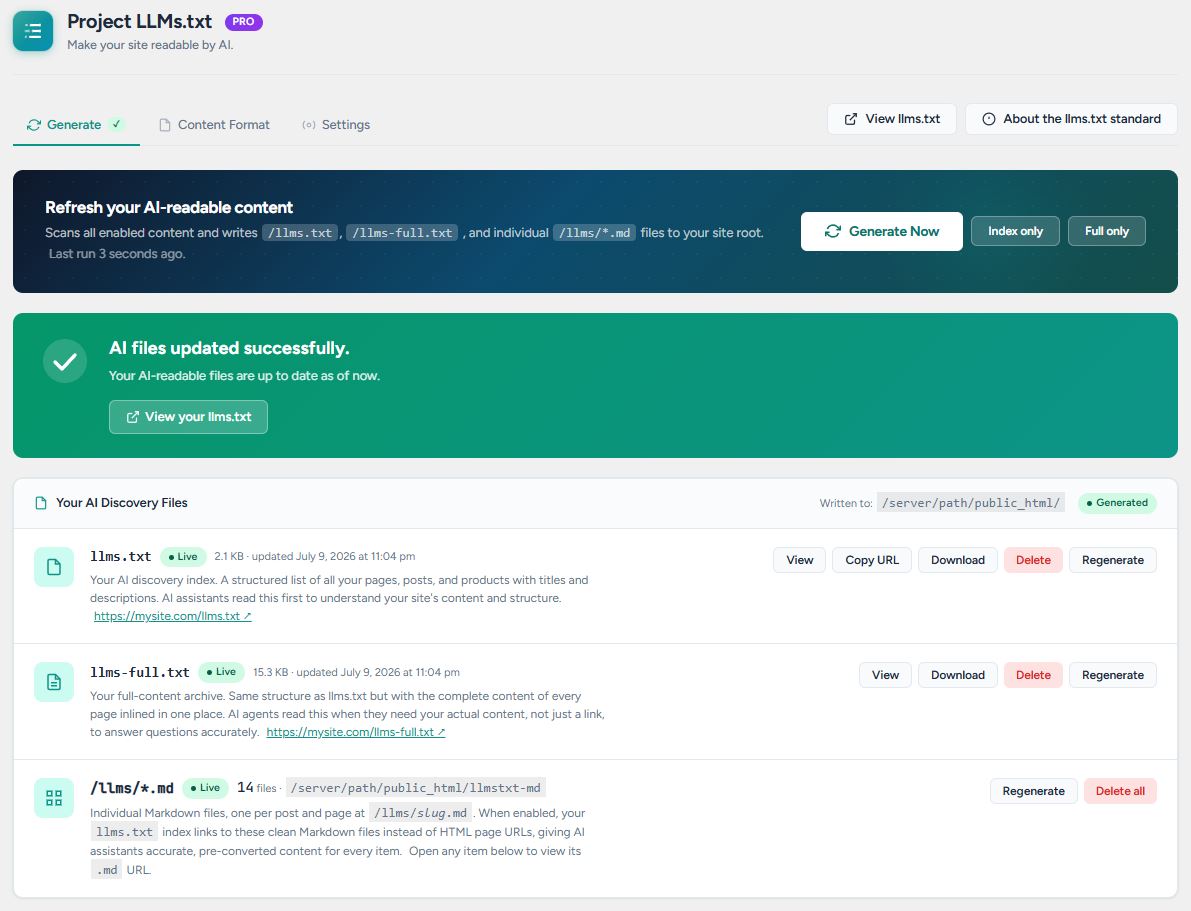
/llms.txt– a clean, structured index at your site root listing every page, post, and product with a short description, formatted per the llms.txt spec./llms-full.txt– the same index with the full Markdown body of every page inlined after it, so assistants have the complete context in one fetch./llms/slug.md(Pro) – per-page Markdown files so AI assistants can retrieve a single page without pulling the whole corpus.
Everything is generated from your existing content. No re-writing, no rebuilding.
Why It Matters
Markdown is the format AI reads most cleanly. Most websites are a tangle of HTML with navigation, ads, cookie banners, page-builder wrappers, etc., that AI tools have to fight through to find the actual content. When an AI agent or assistant visits your site and finds a clean /llms.txt, it gets a structured index of everything on your site in one fetch, already in the format it reads best. Whether it came looking for the file or simply landed there, the result is the same: a complete, accurate picture of your site instead of a pile of noisy markup.
The llms.txt standard is still early, as no major search engine has announced official support yet, but a growing ecosystem of AI agents, coding assistants, and developer tooling already understands it. Companies like Stripe, Vercel, Cloudflare, and Anthropic publish their own llms.txt files themselves.
Publishing now is cheap insurance. The file costs nothing to generate and keeps your site ready as the ecosystem matures.
How It Works
- Scans your posts, pages, products, and custom post types
- Reads your published content (blocks, shortcodes, and page-builder output), with full-page scraping available for anything your theme renders outside the editor
- When scraping, extracts the main content zone using a Readability-style algorithm
- Converts that HTML to clean, structured Markdown
- Assembles the results into
/llms.txt,/llms-full.txt, and (Pro) per-page/llms/*.mdfiles at your site root
Key Features
- Flexible content extraction – Reads your published content (blocks, shortcodes, and page-builder output like Divi and Visual Composer) by default, with an optional full-page scrape for sections your theme, or a builder like Elementor, renders outside the editor.
- WooCommerce first-class support – Products include structured price, SKU, stock status, variations, customer reviews, and related/upsell products.
- Clean, structured output – Built-in Markdown templates for every content type produce well-formatted output out of the box, with no setup. (Editing the templates is a Pro feature.)
- Physical file or live endpoint – Write actual files to your site root (fastest for crawlers) or serve dynamically via WordPress rewrite rules.
- Automatic backups – Before each regeneration, the previous llms.txt and llms-full.txt are saved (the five most recent are kept), so a bad generation never costs you a good file.
- Smart content selector – Auto-detects your main content zone. Override with a CSS selector for custom themes.
- WP-CLI integration –
wp llmstxt generate,status,list, andclearfor automation and CI pipelines. - Respects your SEO settings – Pages marked noindex or nofollow in Yoast, Rank Math, SEOPress, AIOSEO, or Slim SEO are excluded from the public files automatically.
- Bulk-import friendly – Public regeneration hooks let WP All Import or any custom script rebuild your files after a bulk import or migration, so your llms.txt never drifts from your content.
- No tracking, no cookies – No third-party scripts, no analytics, no cookies. Nothing about your site or visitors is sent anywhere. Runs entirely on your server, GPL-licensed.
Pro Features
Pro is a separate plugin, distributed from projectllmstxt.com – none of its functionality is included (or locked) in this free plugin.
- Auto-regenerate on publish – Files rebuild in the background, usually within about a minute of saving content (with a 5-minute debounce for bulk edits).
- Custom templates per content type – Edit and save templates; bulk-regenerate all matching pages with one click.
- Individual
.mdfiles – Physical files at/llms/slug.md, served directly by Apache/Nginx. - Post editor AI Preview – See and edit exactly what AI will read, right from the post editor.
- Per-page Markdown overrides – Hand-tune one page without touching the rest. Free users can preview each page’s Markdown; editing requires Pro.
- Custom field mapping – Pull ACF fields and any post meta into your output as
{{acf_*}}and{{meta_*}}template variables. Sensitive keys (passwords, tokens, API keys) are blocked from output by default. - Agency license – Unlimited sites.
A note on special characters
The generated files are UTF-8, which every AI assistant and crawler reads correctly. If accented letters or symbols look garbled when you open llms.txt directly in a browser, your web server is serving .txt files without a charset declaration – the file itself is fine. Ask your host to add AddDefaultCharset UTF-8, or switch to Live Endpoint mode, which always declares the charset.
Bundled assets
The admin interface bundles the Figtree and JetBrains Mono typefaces, both licensed under the SIL Open Font License 1.1. Nothing is loaded from third-party servers.
Links
Obrázky


Inštalácia
From the WordPress Dashboard
- Go to Plugins Add New
- Search for Project LLMs.txt
- Click Install Now, then Activate
- Navigate to Project LLMs.txt in your admin sidebar
- Review your site info and content types under Settings
- Click Generate Now on the Generate tab
Manual Installation
- Download the plugin zip
- Go to Plugins Add New Upload Plugin
- Upload the zip file and activate
- Follow steps 4-6 above
Requirements
- WordPress 6.4 or higher
- PHP 8.1 or higher
- For physical file mode: write permission to your WordPress root directory
- WooCommerce 7.0+ (optional, for product support)
Časté otázky
-
What is llms.txt?
-
llms.txt is an emerging open standard – think
robots.txtfor AI. It’s a clean, structured Markdown file placed at the root of your site (yourdomain.com/llms.txt) that gives AI assistants and agents a reliable, structured entry point into your content. See llmstxt.org for the full spec. -
Do AI assistants actually use it?
-
No major search engine or LLM provider has officially announced that they seek out
llms.txtfiles. But that’s not the whole picture.Markdown is the format AI reads best, and this plugin converts your entire site into exactly that. When any AI tool – a browsing agent, a coding assistant, an AI-powered search product – visits your site and finds a clean
/llms.txt, it gets a structured index of everything on your site in one fetch, already in the format it reads most cleanly. It doesn’t have to fight through navigation, ads, or page-builder markup to understand what your site is about. That’s a real advantage regardless of whether the tool came looking for the file or just happened to land on your domain.What actively uses it today: AI agents, coding assistants, MCP servers, and developer-facing AI products. Companies like Stripe, Vercel, Cloudflare, and Anthropic already publish their own
llms.txtfiles for this reason.Publishing now costs nothing and keeps your site ready as the ecosystem matures.
-
Does this work with Elementor / Divi / Visual Composer?
-
Yes. By default the plugin reads your published content, which covers shortcode-based builders like Divi (classic) and Visual Composer, whose layouts expand through WordPress’s normal content filters.
For builders or theme sections that render their layout outside the editor (for example Elementor, which stores its layout separately and renders it through a hook), switch Extraction Method to Full-page scrape under Settings Content Extraction. That loads each page the way a browser does and keeps just the main content.
If automatic content detection grabs the wrong zone, you can also set a custom CSS selector in the same place (e.g.,
.site-content,main article,#content). -
Does it support WooCommerce?
-
Yes, WooCommerce products are a first-class content type. Product files include: name, SKU, price (regular + sale), stock status, short description, full description, categories, tags, dimensions/weight, product variations with pricing, customer reviews, and upsell/related products.
-
Does it respect my SEO noindex settings?
-
Yes. If a page is set to noindex or nofollow in Yoast, Rank Math, SEOPress, AIOSEO, or Slim SEO, it is left out of your
llms.txtfiles automatically. Pages you keep out of search stay out of AI, with no extra configuration. Developers can extend the check with thellmstxt_seo_noindex_checkfilter. -
Does it keep up with bulk imports?
-
Yes, with a little code. The plugin exposes regeneration action hooks (such as
llmstxt_regenerate) that any plugin or script can fire. We document a WP All Import example usingpmxi_after_xml_import, so yourllms.txtrebuilds after a bulk import, migration, or programmatic update. -
Where are the files written?
-
By default, files are written to your WordPress root directory – the same folder as
wp-config.php. They’ll be accessible atyourdomain.com/llms.txtandyourdomain.com/llms-full.txt.If your host doesn’t allow writes to the root directory, switch to Live Endpoint mode in Settings. This serves the files dynamically via WordPress rewrite rules with no filesystem writes.
-
Will this affect my site’s performance?
-
For your visitors, no. The generated files are static and served directly by your web server, with no PHP execution per request.
Generation itself does real work: it runs on-demand when you click Generate (in batches, so it stays within PHP time limits), and for Pro users auto-regeneration runs in the background via WP Cron. On very large sites a full regeneration can take a little while, which is why auto-regeneration is debounced and scoped: routine edits re-render only the posts that changed rather than the whole site.
-
Is my content sent anywhere?
-
No. All processing happens on your own server. The plugin does not send your content to any external API or service. It only reads your existing published content and writes
.txt/.mdfiles to disk. -
Can I exclude specific pages?
-
Yes. In Settings Content to Include, check any pages you want left out of the AI files. When WooCommerce is active, its Cart, Checkout, and My Account pages are excluded automatically – they’re checkout mechanics with no value to AI assistants. Developers can adjust the final list with the
llmstxt_exclude_idsfilter. -
Does it work with multisite?
-
Single-site only for now. Multisite support is on the roadmap.
-
How often should I regenerate?
-
With the free version, regenerate manually after significant content updates. With Pro, auto-regeneration handles this for you – files update automatically within about a minute of any publish event.
-
Can I customize the Markdown output?
-
Free: No. The default templates produce clean, well-structured Markdown out of the box, and you can preview the generated Markdown for any page, but customizing it requires Pro.
Pro: Full template editor with per-content-type templates, plus per-page overrides to hand-edit any page’s output and field mapping to pull ACF and custom meta into your files. Use{{variable}}tokens (e.g.,{{title}},{{price}},{{content}}) and conditional blocks{{#variable}}...{{/variable}}. -
My site root isn’t writable – what do I do?
-
Switch to Live Endpoint mode in Settings File Serving Mode. The files will be served dynamically via WordPress. Alternatively, contact your host or adjust directory permissions to allow PHP writes to your root.
Recenzie
Pre tento plugin nie sú žiadne recenzie.
Prispievatelia a vývojári
“Project LLMs.txt” je softvér s otvoreným zdrojovým kódom. Do tohto pluginu prispeli nasledujúci ľudia.
Prispievatelia
Preložiť „Project LLMs.txt“ do vašho jazyka.
Máte záujem o vývoj?
Prehľadávajte zdrojový kód, preskúmajte SVN repozitár, alebo sa prihláste na odber vývojárskeho logu cez RSS.
Zoznam zmien
1.0.0
- Initial public release.
- Generates
/llms.txtand/llms-full.txtfrom your existing WordPress content. - Three extraction methods: Auto (default, reads published content with scrape fallback), Post content only, and Full-page scrape for builders like Elementor.
- Batched generation with live progress – works reliably on large sites without hitting PHP time limits.
- Template system with per-content-type
{{variable}}templates (Pro: custom editable templates). - Physical file or live endpoint serving modes.
- WooCommerce product support with price, SKU, stock, variations, reviews, and related products.
- WP-CLI commands:
generate,status,list, andclear. - Pro: auto-regenerate on publish, individual
/llms/slug.mdfiles, post editor AI Preview, per-page overrides, ACF/meta field mapping. - Security: password-protected and non-published content excluded from public AI file output.
- Security: sensitive post meta keys blocked from export; live endpoint mode rate-limited and cached.