

Popis
seljeDrive Document Library for Google Drive lets you publish a Google Drive folder on your WordPress site as a simple file explorer.
Find this free plugin useful? Please support my work on this plugin by sending me a one-time donation (50% of the proceeds go to Ukraine).
Key features:
- Browse a Google Drive folder (via a shared folder link)
- Search inside the library
- Open files in a new tab or download files
- Create multiple libraries and embed each with a shortcode
- Control access per library:
- Public
- Logged-in users
- Specific roles
Find this free plugin useful? Please support my work on this plugin by making a donation.
Privacy
This plugin relies on third party services to function.
Google Drive is a trademark of Google LLC. This plugin is not affiliated with or endorsed by Google.
WordPress is a trademark of the WordPress Foundation. This plugin is not affiliated with or sponsored by, the WordPress Foundation.
Third Party Services
Google (Google OAuth + Google Drive API)
What it is used for:
- Connecting your WordPress site to Google (OAuth)
- Listing/searching files and folders from Google Drive
- Opening/downloading files via Google-hosted URLs
When data is sent:
- When an administrator clicks Connect Google and completes authorization
- When anyone views a page that contains the
[sg_doc_library]shortcode (your WordPress site fetches file/folder metadata from Google to render the library) - When a visitor uses Search / Open / Download inside the library
- When the plugin refreshes an expired access token (if you have connected with offline access)
What data is sent:
- During OAuth authorization (admin action): client ID, redirect URI, state, requested scope, and an authorization code
- During API calls to Google Drive: an OAuth access token (in an Authorization header), Google Drive file/folder IDs, and search terms entered by the user (if search is used)
- During Open/Download (visitor action): your WordPress site returns a redirect URL and the visitor’s browser is sent to a Google-hosted URL containing the file ID (for example
docs.google.comexport links ordrive.google.comdownload links)
Data flow / conditions:
- Google Drive API requests are made server-to-server (from your WordPress site to Google) using the OAuth token stored in your WordPress database.
- The visitor’s browser is only sent directly to Google when the visitor clicks Open or Download.
Endpoints contacted:
- https://accounts.google.com/o/oauth2/v2/auth
- https://oauth2.googleapis.com/token
- https://www.googleapis.com/drive/v3
Visitor browser destinations (when using Open/Download):
- https://docs.google.com/
- https://drive.google.com/
OAuth scope:
- https://www.googleapis.com/auth/drive.readonly
Google Privacy Policy:
- https://policies.google.com/privacy
Google Terms of Service:
- https://policies.google.com/terms
Google APIs Terms of Service:
- https://developers.google.com/terms
Stripe (Donate link)
What it is used for:
- Optional donations via a Stripe-hosted checkout page
When data is sent:
- Only when an administrator clicks the Donate button in the plugin admin page
What data is sent:
- The plugin itself does not send payment details. Clicking Donate opens a Stripe-hosted page in your browser. Stripe then receives the data needed to load and process the checkout (such as your IP address, browser/user agent, and any information you enter on the checkout page).
Stripe Privacy Policy:
- https://stripe.com/privacy
Stripe Terms / Legal:
- https://stripe.com/legal
Configuration
Google OAuth
- In Google Cloud Console:
- Enable Google Drive API
- Create an OAuth 2.0 Client ID (type: Web application)
- In WordPress admin:
- Go to Settings -> seljeDrive Document Library for Google Drive
- Add your Client ID and Client Secret
- Copy the Redirect URI shown on the plugin admin page
- Back in Google Cloud Console:
- Add that Redirect URI as an authorized redirect URI
- Back in WordPress:
- Click Connect Google
Create a library
- Go to Settings -> seljeDrive Document Library for Google Drive
- Under Libraries, add a library:
- Name
- Public Folder Share URL
- Access mode
- Save.
Obrázky
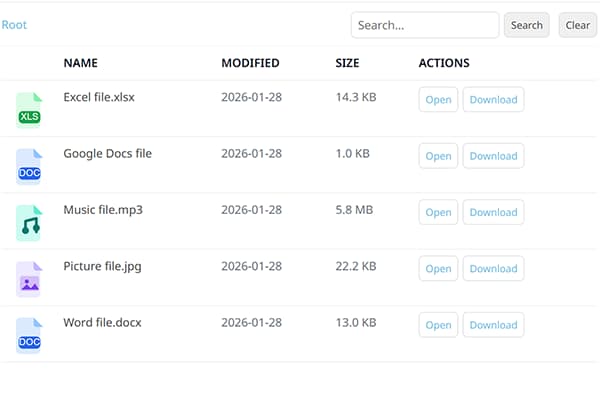
Frontend file explorer. 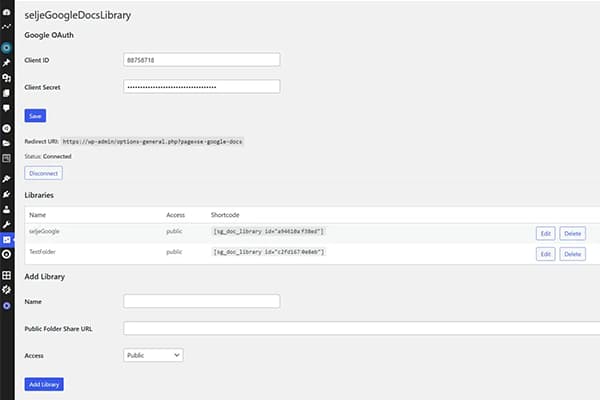
Plugin admin page.
Inštalácia
- In WordPress admin, go to Plugins -> Add New.
- Search for seljeDrive Document Library for Google Drive.
- Click Install Now and then Activate.
Časté otázky
-
How do I embed a library on a page?
-
Use the shortcode shown in the Libraries list, for example:
[sg_doc_library id="YOUR_LIBRARY_ID"] -
What PHP version is required?
-
Minimum required PHP is 7.4.
-
Does it support Norwegian language?
-
Yes. The plugin is translation-ready and includes a Norwegian Bokmål (
nb_NO) translation source file.WordPress typically uses compiled
.mofiles at runtime.
Recenzie
Pre tento plugin nie sú žiadne recenzie.
Prispievatelia a vývojári
“seljeDrive Document Library for Google Drive” je softvér s otvoreným zdrojovým kódom. Do tohto pluginu prispeli nasledujúci ľudia.
Prispievatelia
„seljeDrive Document Library for Google Drive“ bol preložený do 2 jazykov. Ďakujeme prekladateľom za ich príspevky.
Preložiť „seljeDrive Document Library for Google Drive“ do vašho jazyka.
Máte záujem o vývoj?
Prehľadávajte zdrojový kód, preskúmajte SVN repozitár, alebo sa prihláste na odber vývojárskeho logu cez RSS.
Zoznam zmien
1.2.1
- Fixed missing template file and admin CSS that caused a broken admin page after the 1.2.0 update
1.2.0
- Moved settings page from Tools to Settings menu
- Admin notices now display feedback after save, connect, disconnect, and delete actions
- Client Secret is now encrypted at rest (AES-256-CBC)
- Folder listings now paginate beyond 200 files (up to 2 000)
- Added rate limiting on REST endpoints (60 requests/minute per IP)
- Stale folder cache cleared automatically when a library is deleted
- Admin page HTML extracted to a separate template file for maintainability
- Added placeholder text to the Allowed file extensions field
1.1.0
- Added per-library option to choose frontend language (installed WordPress languages)
1.0.3
- Added option to show Google Drive file preview thumbnails as icons
- Improved copied confirmation when clicking the shortcode
1.0.2
- Added option to remove header from frontend
- Added option to customize the root folder label
1.0.1
- Renamed main plugin file
- Version bump
0.70
- Backend moved to Tools menu
- Added hover tooltips in the backend
- Improved translation loading (incl. locale switch support)
- Updated donate button styling
0.64
- Removed Freemius dependency
- All features available in the single WordPress.org version (multi-library, access control, full-text search)
- Updated external service disclosures (Google APIs, Stripe)
0.63
- WordPress.org compliance fixes (text domain alignment, translation loading, security/escaping)
0.62
- Minor language update
0.61
- Added a non-intrusive Donate button in the plugin admin page
0.60
- Fixed Google Drive search error for full-text queries
- Security hardening for REST references
0.5
- Multi-library support (multiple shortcodes on one page)
- Added icons in the file list
0.1.2
- Added translations support (including Norwegian Bokmål source translation)
- Improved admin UI translations