

Popis
The File Upload Limiter plugin allows you to set specific upload size limits for different types of files in the WordPress backend. This ensures that users cannot upload files that exceed the defined limits, helping to manage server resources effectively.
Features:
* Set upload limits for images, documents, audio, video, and other file types.
* Define limits in kilobytes (KB).
* Easy-to-use settings page in the WordPress admin area.
License
This plugin is licensed under the GPL-2.0 or later. For more information, see the LICENSE.txt file included with this plugin.
Arbitrary section
You can use this section to provide any additional information you feel is relevant for users of your plugin.
Obrázky
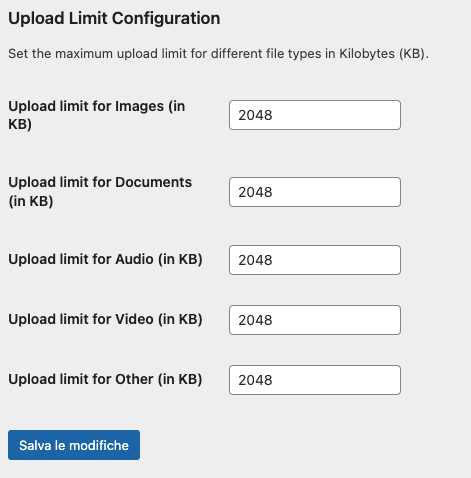
The settings page where you can define upload limits for different file types.
Inštalácia
- Upload the
file-upload-limiterfolder to the/wp-content/plugins/directory. - Activate the plugin through the ‚Plugins‘ menu in WordPress.
- Go to ‚Settings‘ > ‚File Upload Limiter‘ to configure the upload limits.
Časté otázky
-
Can I set different limits for different file types?
-
Yes, you can set individual upload limits for images, documents, audio, video, and other file types from the plugin’s settings page.
-
What happens if a user tries to upload a file that exceeds the limit?
-
The user will receive an error message indicating that the file is too large and specifying the allowed limit for that file type.
Recenzie
Pre tento plugin nie sú žiadne recenzie.
Prispievatelia a vývojári
“File Upload Limiter” je softvér s otvoreným zdrojovým kódom. Do tohto pluginu prispeli nasledujúci ľudia.
Prispievatelia
Preložiť „File Upload Limiter“ do vašho jazyka.
Máte záujem o vývoj?
Prehľadávajte zdrojový kód, preskúmajte SVN repozitár, alebo sa prihláste na odber vývojárskeho logu cez RSS.
Zoznam zmien
1.0
- Initial release.